


Why Are Lightgun Games So Hard to Find for My Cabinet
Lightgun cabinets look simple from the outside. Add a gun, load a shooter, and start blasting targets. Then the search begins, and suddenly it feels like every game is rare, unsupported, legally messy, or made for hardware you do not own.
That frustration is real. Lightgun games sit at the awkward intersection of old arcade hardware, home console ports, modern display problems, licensing issues, and emulator setup. The games exist, but they are not always easy to buy, install, or run cleanly on a cabinet.

The best places to look first
The easiest starting point is modern PC releases. Some newer rail shooters and arcade-style shooters support a mouse, which means they can often work with modern lightgun solutions that translate aim into mouse input. Steam is usually the first place to check, followed by GOG and direct releases from small developers.
Search using terms like:
`rail shooter`
`light gun`
`arcade shooter`
`on-rails shooter`
`gallery shooter`
Do not rely on search alone. Many compatible games never use the phrase “light gun” in the listing. A game that supports mouse aiming may work well with a Sinden Lightgun, Gun4IR setup, AimTrak, or similar cabinet hardware.
The second place to look is arcade emulation, usually through MAME or a cabinet front end that supports it. This is where many classic arcade cabinet games live, including famous police, zombie, alien, and target shooters. The catch is legality. Emulators are legal tools, but game ROMs are copyrighted. The clean route is to use games you legally own and dump yourself, or buy officially licensed collections when available.
The third source is console ports. PlayStation, Dreamcast, Wii, and other platforms had strong gun-style libraries. Some ports work surprisingly well in a cabinet, especially if the emulator supports mouse input or lightgun mapping. Setup can take more work than PC games, but the library opens up fast.
Why the original arcade games are harder than other genres
Most arcade games use simple controls. A joystick and buttons can be mapped to almost anything. Lightgun games are different. They often expect very specific input hardware.
Older cabinets used CRT displays and timing-based gun systems. The gun did not “see” the screen like a camera. Instead, the game and display worked together in a way that depended on the scan behavior of a tube monitor. Modern LCD and OLED screens do not behave that way.
That means many old light gun games cannot simply be plugged into a flat-screen cabinet and expected to work. You need hardware that recreates the experience in a new way, usually through sensors, cameras, infrared LEDs, or screen-border tracking.

This is why a standard multicade setup can run hundreds of joystick games with little trouble, but lightgun support feels like a separate project. The games are not always the problem. The input chain is.
Licensing keeps many classics locked away
Another reason these games are hard to find is licensing. Arcade shooters often include:
Real weapon designs
Licensed movie or TV properties
Voice acting and music rights
Publisher-owned characters
Middleware or arcade board technology
When a company rereleases an old platformer, it may only need to clear the game itself. With a lightgun shooter, the legal trail can be more tangled. If the game used a film license, a celebrity likeness, or branded hardware, a modern rerelease may not be worth the cost.
That is why some classics appear in official collections while others disappear for years. It is rarely because nobody remembers them. More often, the rights are split, unclear, or too expensive to revisit.
Hardware choice affects the game list
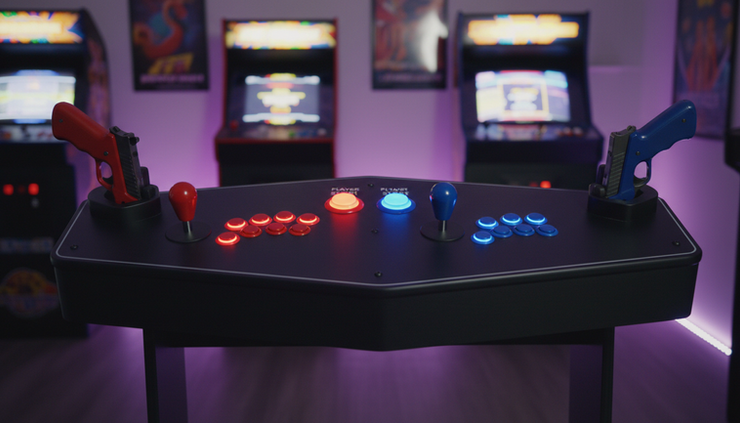
Before building a library, identify what your cabinet actually supports. This matters more than most people expect.
A Sinden Lightgun uses a camera and a white border around the screen. It works well with many PC games and emulators that accept mouse input, but some people dislike the border.
A Gun4IR setup uses infrared points and custom hardware. It can feel very accurate, but it takes more DIY work and careful setup.
An AimTrak-style gun uses sensor bars and behaves like a mouse. It can be simpler to install, though calibration and accuracy vary by cabinet layout.
A real CRT arcade setup can run original-style hardware more authentically, but it is heavier, harder to maintain, and less practical for many home cabinets.
Match the game to the gun, not the other way around. A game that looks perfect in a YouTube video may require a different input method than yours.
How to build a practical lightgun library
Start with games that are easy to test. Pick a few PC shooters with mouse support and confirm that your guns track correctly. Once the basics work, add emulators one platform at a time.
A smart order looks like this:
Test Windows mouse input
Make sure each gun aims, clicks, reloads, and calibrates outside of a game.
Add one PC game
Choose a simple rail shooter or target shooter before chasing complicated classics.
Set up MAME lightgun controls
Configure one game fully, then clone the settings where possible.
Add console emulators later
Console lightgun games can be excellent, but each system has its own input quirks.
Use a front end only after the games work
LaunchBox, BigBox, Attract-Mode, and similar front ends are great, but they should not hide broken controls.
Keep notes as you go. Record which emulator version, input setting, and gun profile works for each title. Six months later, that little text file can save hours.
Avoid the sketchy “complete collections” trap
If you search long enough, you will find giant downloads promising every shooter ever made. They may look tempting, but they often create more problems than they solve.
Common issues include broken controls, mislabeled games, missing files, strange emulator versions, and illegal distribution. Even when they launch, they may not match your hardware. A cabinet needs reliable setup more than a massive list.
A smaller, tested library is better than a huge menu full of games that do not reload, aim, or exit correctly.

Where to actually find the games
For legitimate sources, check these places first:
Steam
Best for newer PC rail shooters, indie arcade shooters, and mouse-compatible games.
GOG
Useful for older PC titles when available, often with fewer launcher issues.
Official publisher collections
Some classic shooters appear in licensed arcade or console collections.
Original discs and cartridges
Console versions can be used with the right hardware or emulator workflow, depending on your setup and local law.
MAME with legally obtained ROMs
Best for preserving arcade originals, but only when you have the legal right to use the game files.
Lightgun community forums and Discord groups
Good for compatibility lists, setup tips, and hardware profiles. Avoid links to pirated downloads.
The real reason it feels so hard
Lightgun cabinets are not hard because the genre is dead. They are hard because the old technology was tied to CRTs, the rights are messy, and modern guns all solve the problem differently.
The path gets much easier when you stop hunting for “every game” and start building a working set. Choose your gun hardware, test mouse input, add a few legal PC titles, then expand into emulation and console ports. A cabinet with 20 shooters that work perfectly is far more fun than a menu of 200 broken promises.


Comments